
GribStream Blog
Query weather data with MySQL: GribStream public beta
Connect ordinary MySQL clients and drivers to GribStream, use your API token as the password, and run weather queries that return ordinary rows.
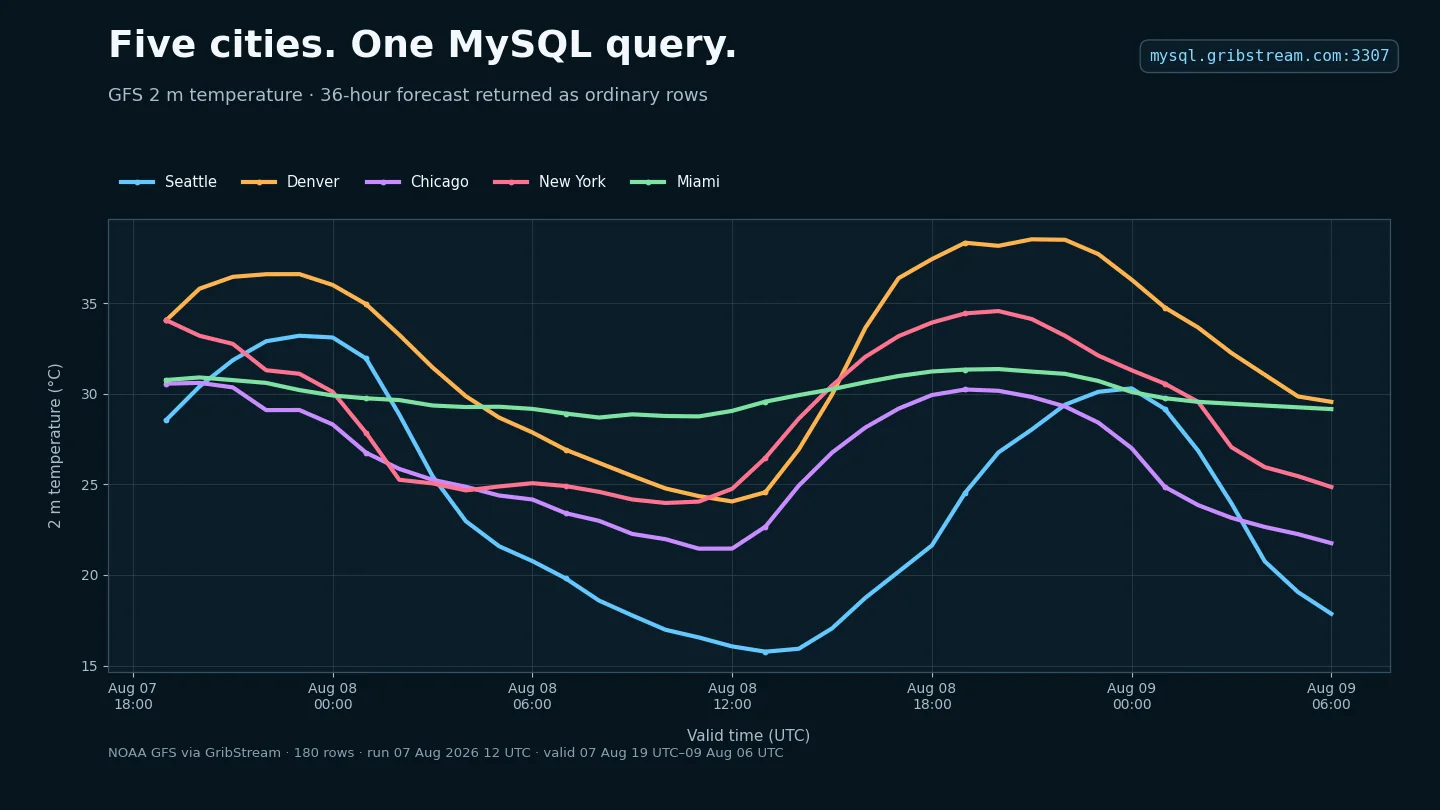
GribStream now has a MySQL-compatible connection in public beta. If a language, notebook, command-line tool, or application can connect to MySQL, it can use the same familiar interface to query GribStream weather data.
Connect to mysql.gribstream.com on port 3307. Use your GribStream API token as the password, choose a dataset such as gfs as the database, and receive ordinary MySQL rows.
This is a public beta. We do not yet recommend the connection for production workloads, and the supported SQL may change as we learn from real usage. Please report issues or send feedback, or join us on Discord.
A short MySQL session
There is no MySQL server to install and no weather data to import. With the MySQL command-line client, the complete connection is:
mysql --host=mysql.gribstream.com \
  --port=3307 \
  --user=gribstream \
  --password \
  --ssl-mode=REQUIRED
The client prompts for your existing API token. TLS is required, and this MySQL command enables it explicitly; MariaDB clients use --ssl instead. Once connected, datasets look like databases. The output below is shortened throughout the session:
mysql> SHOW DATABASES;
+--------------------+
| Database           |
+--------------------+
| aifsoper           |
| era5               |
| gfs                |
| hrrr               |
| ifsoper            |
| ...                |
+--------------------+

mysql> USE gfs;
Database changed
Each dataset has a timeseries table for the best eligible forecast at each valid time and a runs table for querying specific model runs. The available weather parameters appear as columns. Standard schema discovery shows the time and location fields alongside dataset-specific values:
mysql> SHOW COLUMNS FROM gfs.timeseries;
+-----------------------+-------------+------+-----+---------+-------+
| Field                 | Type        | Null | Key | Default | Extra |
+-----------------------+-------------+------+-----+---------+-------+
| forecasted_at         | datetime(6) | YES  |     | NULL    |       |
| forecasted_time       | datetime(6) | YES  |     | NULL    |       |
| lat                   | double      | YES  |     | NULL    |       |
| lon                   | double      | YES  |     | NULL    |       |
| lead_time             | double      | YES  |     | NULL    |       |
| ...                   | ...         | ...  | ... | ...     | ...   |
| tmp_2_m_above_ground  | double      | YES  |     | NULL    |       |
| ...                   | ...         | ...  | ... | ...     | ...   |
+-----------------------+-------------+------+-----+---------+-------+
The output is shortened here. tmp_2_m_above_ground is GFS temperature at 2 metres, in the model's native Kelvin units. It can be selected, calculated, filtered, and aliased like a numeric column.
Here is the query behind the chart at the top of this post. It retrieves 36 hourly forecasts for five cities and converts the temperature to Celsius:
SELECT forecasted_time, name,
       tmp_2_m_above_ground AS temp_k,
       ROUND(temp_k - 273.15, 2) AS temp_c
FROM gfs.timeseries
WHERE forecasted_time BETWEEN '2026-08-07 19:00:00'
                          AND '2026-08-09 06:00:00'
  AND forecasted_at <= '2026-08-07 12:00:00'
  AND (lat, lon, name) IN (
        (47.6062, -122.3321, 'Seattle'),
        (39.7392, -104.9903, 'Denver'),
        (41.8781,  -87.6298, 'Chicago'),
        (40.7128,  -74.0060, 'New York'),
        (25.7617,  -80.1918, 'Miami')
      )
  AND lead_time BETWEEN '0h' AND '48h'
ORDER BY forecasted_time, name;
The forecasted_at cutoff keeps the result on the 7 August 12 UTC model run used for the chart. The full query returns 180 rows; this is its first valid time:
+---------------------+----------+------------+--------+
| forecasted_time     | name     | temp_k     | temp_c |
+---------------------+----------+------------+--------+
| 2026-08-07 19:00:00 | Chicago  | 303.708350 |  30.56 |
| 2026-08-07 19:00:00 | Denver   | 307.208350 |  34.06 |
| 2026-08-07 19:00:00 | Miami    | 303.908350 |  30.76 |
| 2026-08-07 19:00:00 | New York | 307.208350 |  34.06 |
| 2026-08-07 19:00:00 | Seattle  | 301.708350 |  28.56 |
+---------------------+----------+------------+--------+
The connection is read only. It is a focused interface for asking weather-data questions, not a general-purpose relational database.
Why MySQL?
MySQL already has mature clients for most programming languages and data environments. That gives GribStream users connection pools, prepared statements, typed rows, incremental result reading, and query cancellation without adopting another client library.
The complete MySQL guide has ready-to-run examples for the CLI, Python, Java, C#, Go, Node.js, Rust, C, and DuckDB, followed by the complete supported SQL reference.
The connection can also be useful with AI tools that already have a generic MySQL connector. The downloadable GribStream MySQL skill file teaches an agent how to explore the catalog and construct bounded weather queries.
A focused SQL interface
The beta covers the SQL needed to choose a dataset, time range, locations, forecast lead times, ensemble members, and weather values. You can calculate derived values, filter rows, use relative times and named time zones, and order bounded results for interactive exploration.
This is deliberately not all of MySQL. Weather queries do not support writes, joins, subqueries, aggregation, grouping, or SELECT *. Unsupported syntax returns a clear error, and the SQL guide documents the supported forms with examples.
Large pulls, streaming, and quota
For large downloads, configure the client to process rows as they arrive instead of collecting the entire result in memory. The MySQL CLI uses --quick; other clients usually call this an unbuffered, streaming, iterative, or chunked result mode. The guide links to the relevant client documentation.
For backfills and other high-volume downloads, omit ORDER BY and sort after receiving the result. Server-side ordering is mainly intended for interactive exploration and bounded results.
Quota usage is based on the weather data read to answer the query, not only the rows ultimately returned. Narrow the time range, coordinates, lead times, members, and selected weather fields before relying on value filters or LIMIT.
Try the public beta
- Create a free GribStream API token, or use an existing token.
- Open the MySQL connection guide and SQL manual.
- Connect to
mysql.gribstream.com:3307with a MySQL client or driver. - Start with a small bounded query and expand it as needed.
The goal is simple: if your environment already speaks MySQL, it should have a direct path to GribStream weather data.